

Register for membership, classes, events & special interest groups (SIGs)
- Spring 2026 workshops are still open for registration!
- OLLI Membership is required for course registration. Membership costs $35 and is valid from July 1–June 30.
- Please note: OLLI cannot accept cash or checks as a form of payment. We can only process the following credit cards: Visa, Discover, and Mastercard.
Need some help? Read Our How-To Guides
To register for courses or workshops, you will need to:
- Sign in to your OLLI account.
- If you’re new or returning since 2024, you will need to create a new account.
- Purchase an OLLI membership for the year.
- Register for the course/workshop.
How To Create an OLLI Account
Welcome to OLLI! If you are new to OLLI or are a returning member who has not registered since 2024, you will need to create a new account.
- Open the OLLI Registration page (opens in new window).
- Click the blue button to Sign In or Create Account.
- On the Sign In page, scroll down to the Create New Account section on the right-hand side.
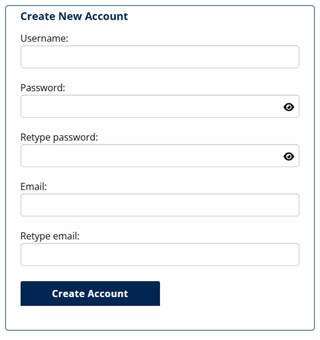
- Create a Username. We recommend your email address.
- Create a password. This must be a minimum of eight characters. It is case sensitive. You may use any combination of upper and lower case letters, numbers, and special characters (!@#$%^&*-+=|?/\).
- You can click on the “eye” icons to see your password as you type.
- You can click on the “eye” icons to see your password as you type.
- Add your email address.
- Click Create Account.
- A form will pop up asking for contact information. Please enter:
- Name
- Address
- Phone
- Date of Birth
- Emergency Contact Information
- Check over the information, then click Submit at the bottom of the form.
- You will be returned to the Registration Home page. You will see your name in the banner image:

Don’t see your name?
If you don’t see your name, you are not signed in. Please try to sign in by clicking the Sign In. If you created a new account but left the site before paying your membership, you will want to sign in using the Existing Account option.
Questions?
Call the OLLI Office at (207) 780-4406.
How to Sign in to Your Existing Account
If you are new to OLLI or are a returning member who has not registered since 2024, you will need to create a new account. Please see the Create an Account tab.
- Go to the OLLI Registration page (opens in new window).
- Click the blue button to Sign In or Create Account.
- On the Sign In page, scroll down to the Sign in to Existing Account section on the left-hand side.
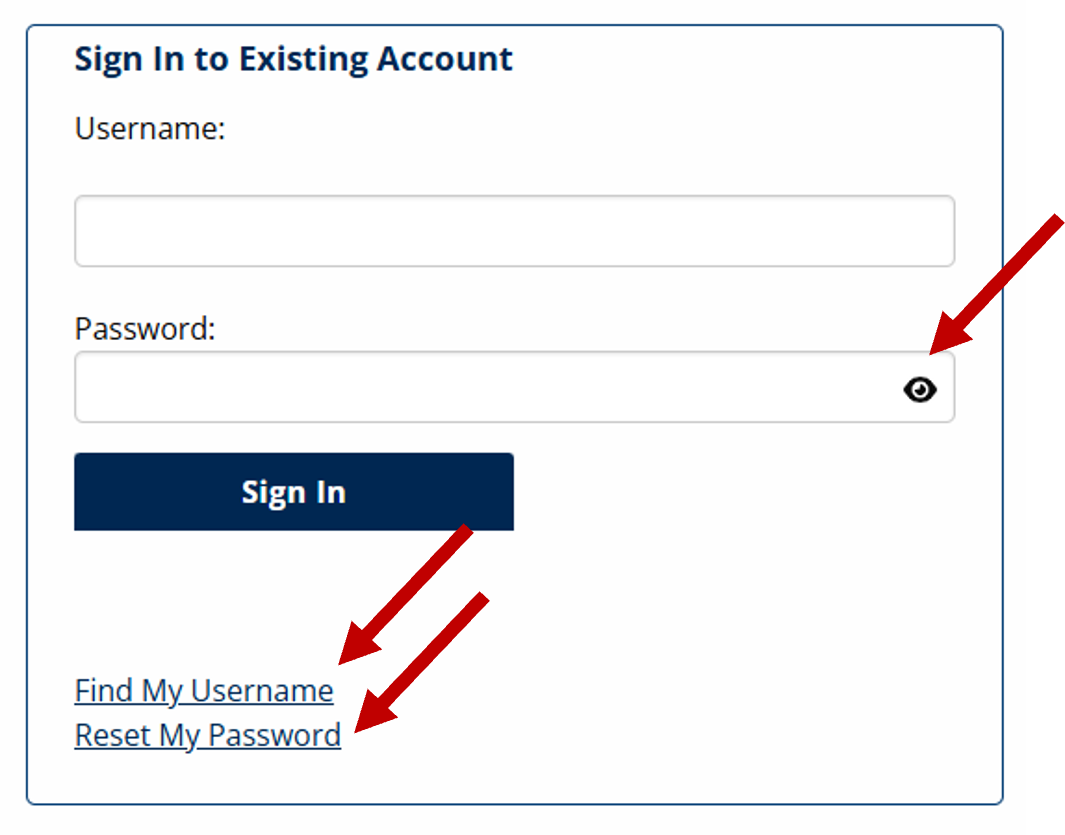
- Enter your Username and Password. You can click on the eye in the Password box to see your password as you type.
- If you forgot your Username, use the Find My Username link.
- If you forgot your Password, use the Reset My Password link.
- If you forgot your Username, use the Find My Username link.
- Click Sign In. You will return to the Registration Homepage. Check that your name appears in the top left of the page next to “Welcome.” If you see your name, you have successfully signed in.
- If you don’t see your name, you are not signed in. Try signing in again and be sure to click Submit.
- If you don’t see your name, you are not signed in. Try signing in again and be sure to click Submit.
How to Purchase an OLLI Membership
- You must be signed in to your OLLI account to pay your annual membership fee.
- Go to the Registration Home page (opens in new window).

- Scroll to the bottom of the page and select the Membership option in the grid.

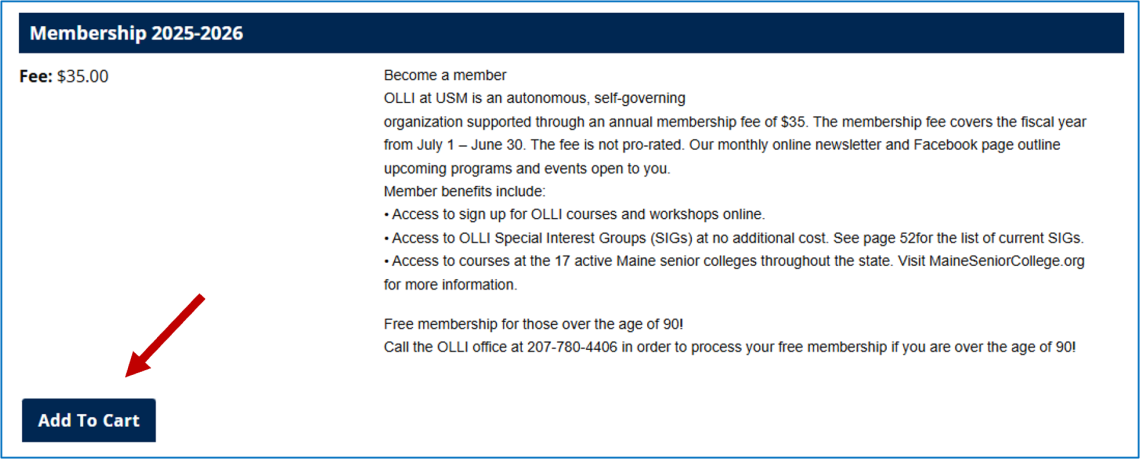
- On the Membership page, scroll down to see the Membership Fee selection.
- Click the Add to Cart button.
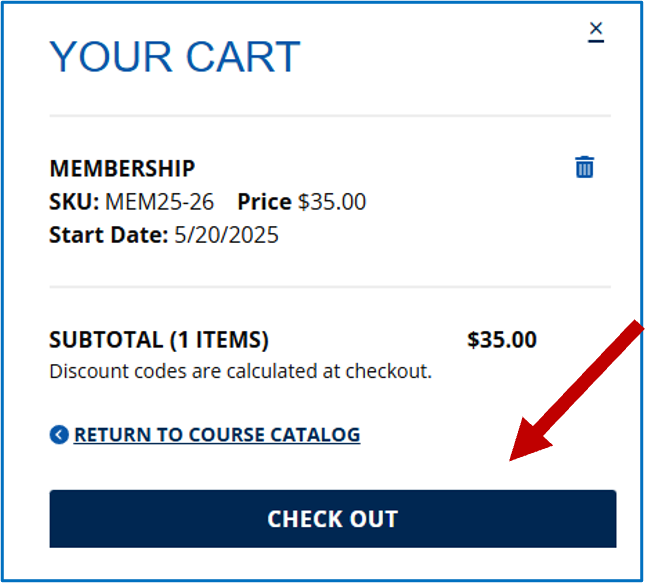
- You will see Your Cart open on the right-hand side. Click Check Out and pay with your credit card – or continue shopping for courses/workshops and pay at once.
Thank you!!!
How to Register for an OLLI Course or Workshop
- You can register for OLLI classes and workshops with a paid current membership or if you add a current membership to your cart. Start on the Registration Home page (opens in new window).
- Confirm your name still appears in the upper left.
- Confirm your name still appears in the upper left.
- Find courses and workshop:
- Scroll to the bottom of the page and select the category you would like to browse.
- If searching for courses, you will see search options by:
- Topic Areas
- Schedule (days of the week and time block)
- Osher Online
- Delivery Style (in-person or Zoom)
- Or you can search a specific course name by clicking on the Search button in the banner at the top of the page.
- Scroll to the bottom of the page and select the category you would like to browse.
- Add the course(s)/workshop(s) you would like to your cart and check out.
- If you don’t see an Add to Cart button:
- Registration may not yet be open.
- You may not be signed in.
- You may need to renew or add your annual membership to your shopping cart.
- If you don’t see an Add to Cart button:
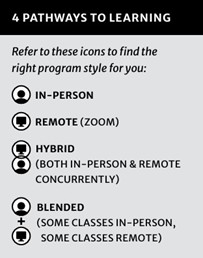
- Be sure to note if the course you are signing up for is in-person, remote, hybrid (both in-person and remote concurrently), or blended (some sessions in-person and some sessions remote).
Alternative to Online Registration
The fastest and most efficient way to register is using the online registration system. If you need an alternative, complete the form included in the printed course catalog. You can then scan and e-mail it to olliatusm@maine.edu, drop it off at the OLLI office in 210 Wishcamper Center, USM Portland Campus, or mail it to OLLI at USM, PO Box 9300, Portland, ME 04104.
Need a printed catalog? Call or email the OLLI Office and we’ll mail one to your home!